> For the complete documentation index, see [llms.txt](https://playnetwork.gitbook.io/play-sdk-documentation/llms.txt). Markdown versions of documentation pages are available by appending `.md` to page URLs; this page is available as [Markdown](https://playnetwork.gitbook.io/play-sdk-documentation/game-design-guides/inventory.md).
# Inventory
Benefits and Use Cases
## Feature Overview
When players buy or earn virtual or NFT virtual items those items are added to their inventory. The Inventory module is primarily supportive - players need somewhere to stash their items!
### Key Benefits
1. **NFT & Regular Virtual Items:** A player's NFT virtual items acquired in the game are also a part of their regular inventory in addition to being in their crypto wallet. This means if the player happens to lose their crypto wallet password, they lose the ability to transfer or stake their NFT virtual items, but their ability to access and use those items in-game remains unaffected.
2. **Upgradeable:** Upgrading is a must-have feature in a wide variety of games, so our inventory supports the upgrading of non-consumable items. This means you can have upgradeable heroes, equipment, etc.
3. **Modifiable:** If you require additional functionality not included in the SDK you may attach your own data in JSON format to virtual items used in the inventory.
4. **Flexible:** Implement the UI/UX in-game based on your needs.
5. **Interoperable**: Our modules also support interoperability for developers who wish to enable this functionality. An example of interoperability would be purchasing an emote in the shop for Game A and then automatically having access to that emote in the player inventory of Game B (the player must also use the PLAY account in both Game A and B).
### In-Game Implementation Examples
Inventory is yet another case where the implementation is going to depend on the genre and audience of your game.
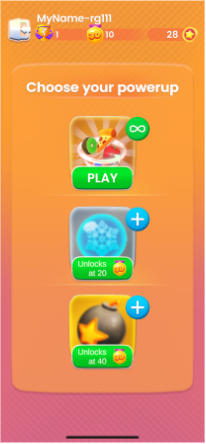
For example, a match-3 inventory will allow players to check their unlocked and available boosters. If the player has zero of a booster there might be a button for a player to "Get More" that will take them to the store. The purpose of the inventory screen is for a player to check their current supply. See the image below for an example of a simple supply-based inventory of powerups.
Powerup Inventory in Match 3D Showdown
{% hint style="info" %}
Consider instead an RPG where the player can manage the various equipment on their character.
The UI/UX implementation of that inventory can vary wildly since players are making comparisons and strategic choices between multiple pairs of boots (and how they work with the rest of the equipment), not just checking if they have any boots left.
It's always a good idea to find some references in games with similar requirements to see what you think works well or doesn't work well about their inventory system. It's a great way to make some informed decisions when planning your implementation.
{% endhint %}